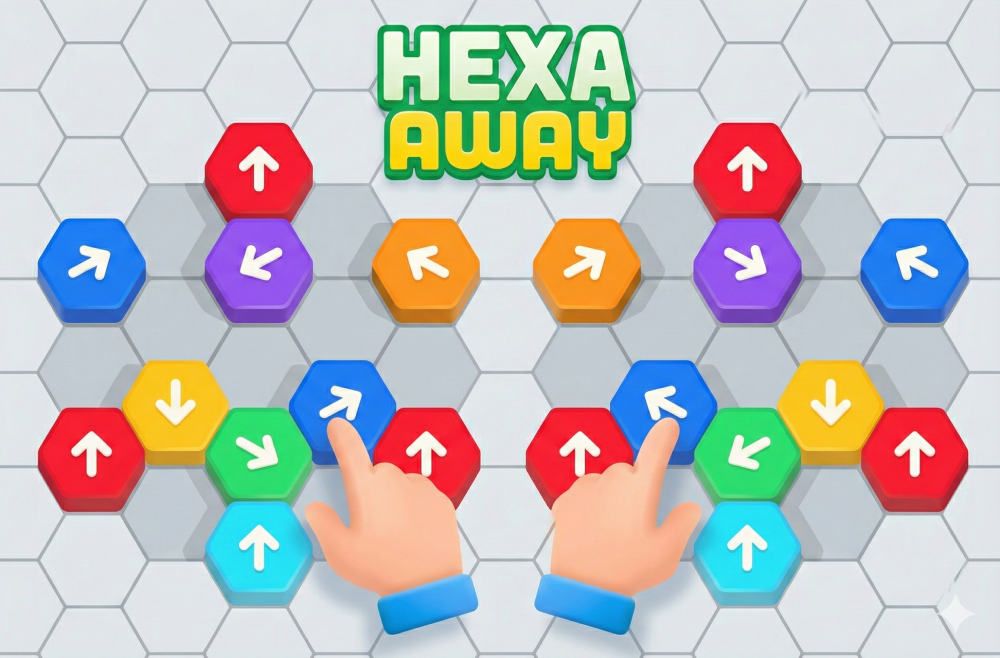

Play Hexa Away online for free - the best hexagon puzzle game unblocked! Give your brain a gentle but steady workout with this addictive logic puzzle. Slide colorful hexagon tiles, clear the board, and solve clever puzzles where every move matters. Each piece can only travel in one direction, so you need to think a few steps ahead before you tap. Play Hexa Away unblocked at school or work!
This free online hexagon puzzle game is perfect for short breaks, calm evenings, and relaxed sessions with friends or family. Play Hexa Away in your browser on computer, tablet, and mobile - no download required! Jump into a level whenever you have a spare minute. If you enjoy brain teasers, logic challenges and tidy puzzle layouts, explore our growing collection of free puzzle games online and contact us with feedback.
What is Hexa Away?
Hexa Away is a colorful hexagon puzzle game where you move pieces to clear the board. Each tile has a fixed direction, shown by an arrow, so you must plan your route before you tap. It feels simple at the start, but each new level adds more tiles and trickier layouts.
The game focuses on calm thinking rather than speed. You can take your time, test a move, and then adjust your approach. Many players use it as a small daily brain warm-up, the same way others use crosswords or number puzzles.
Hexa Away belongs to the logic puzzle genre. Your score comes from smart moves, not from quick reactions. This makes the game friendly for kids, teens, and adults who like problem-solving challenges.
The visual style is bright and clean. Hex tiles slide smoothly, and animations make each move feel satisfying. Nice sound effects add soft feedback without being too loud or distracting.
Gameplay overview of Hexa Away
In each puzzle, you see a board filled with hexagon tiles. Some tiles are plain; others show arrows or special icons. Your goal is to move every tile along its arrow path so that pieces leave the board or reach safe spots.
Because each tile only moves one way, the order of your moves matters a lot. Move one piece too early and it can block the path for others. Good players learn to look at the board as a whole before they make the first tap.
As you progress, the game introduces obstacles. You may find blocked spaces, walls, or tiles that bounce or swap places when hit. These small twists keep Hexa Away fresh and force you to adjust your plans.
Many levels give you a limited number of moves. In these stages, you must reach the solution using the shortest path. This turns each puzzle into a small optimization problem, which is very satisfying when you finally see the clean route.
Hexa Away runs directly in modern browsers on desktop, laptop, tablet, and mobile. There are no extra downloads or plug-ins. Open the page, wait a few seconds, and you can start sliding hex tiles right away.
How to Play Hexa Away - Game Instructions
First, look at the entire board. Notice where the exit spaces or target zones are, and which tiles are closest to them. Try to imagine the path each tile must follow to leave the board or reach its goal.
Next, tap one tile with an arrow to move it. It will slide along its allowed direction until it hits a wall, obstacle, or the edge of the board. Watch where it stops. This new position will affect every move that comes after.
Repeat this process for the remaining tiles. Always keep the final layout in mind. If a move makes the board feel more crowded and messy, it may not be the best choice. If a move opens space or aligns tiles with exits, you are likely on the right track.
Many players solve puzzles by working backward. They first decide where a tile must end, then trace the path in reverse to see where it should start. This backward thinking helps when levels become more complex.
Do not worry about small mistakes. Use undo tools or restart options when a plan clearly fails. Restarting is quick, and often the second attempt feels much easier because you already know which moves do not work.
Try to finish early levels with extra moves left. This builds good habits for later stages, where move limits get tighter and the board becomes more packed.
Quick start
Start with a simple goal: clear one color or one group of tiles at a time. Ignore the rest of the board for a moment and focus on that small cluster. When you master one group, move to the next.
If you feel stuck, zoom out with your eyes and look at the full pattern again. Often the right first move is not near the exit but somewhere in the back row, where a single tap can unlock the whole board.
Objectives and win conditions
The main objective of Hexa Away is to move every active tile to its target. Targets might be exits at the edge, special marked cells, or safe areas in the center. When all goals are met, the level ends and you move to the next one.
Some stages reward you for finishing in fewer moves than the limit. You may earn stars, coins, or other small bonuses for efficient paths. These rewards give extra reasons to replay earlier levels and try tighter solutions.
Losing usually means you run out of moves or trap tiles behind obstacles with no way out. In that case, you can restart the level without penalty. Use each failure as a small hint about which moves you should avoid next time.
Controls
The controls in Hexa Away are very simple. The main action is tapping or clicking tiles to move them along their arrow path.
Keyboard and mouse
On desktop or laptop, you mainly use the mouse or trackpad. Move the cursor over a hexagon tile and click it once. The tile will move in its set direction until it reaches the next stop point.
Some versions also support keyboard shortcuts. For example, you may press R to restart a level or U to undo the last move. These keys are helpful when you test several ideas in quick sequence.
Touch controls (mobile)
On phones and tablets, tap a tile with your finger to move it. The motion is the same as the mouse version, but the touch input feels more direct. Sliding your finger across the board can also help you preview paths.
If the interface offers pinch zoom, use it to look closer at crowded areas. This is useful on small screens where many tiles sit close together, and a tiny obstacle can change the whole plan.
Gamepad (controller)
Some players enjoy puzzle games with a controller. If Hexa Away supports gamepads in your browser or platform, the left stick moves a cursor between tiles, and a main action button selects them.
Another button often handles undo or pause. This layout lets you play from the couch on a big screen while still enjoying precise control over each tile.
Tips and tricks for Hexa Away
Good play in Hexa Away comes from calm thinking and small, repeatable habits. Look ahead, avoid random taps, and do not hurry to move the most obvious piece first. Many puzzles hide their true solution behind a less direct route.
Tips for beginners
- Clear tiles near the exits last, so they do not block routes for deeper pieces.
- Count how many tiles share the same direction before you start moving them.
- Always check what a move will block, not only what it will clear.
- Use undo early; it is better than pushing a broken plan too far.
- Replay easy levels to practice reading the board quickly.
Advanced strategies
- Group tiles into layers and solve them from the back row forward to keep exits free.
- Look for “key tiles” whose motion opens several paths at once; plan your route around them.
- In move-limited stages, try to create long chains where one move clears many tiles.
- Track possible dead ends; if a tile enters a corner with no exit, restart before you push others there.
- When new mechanics appear, spend one attempt just to test how they react to different tiles.
Features of Hexa Away
This hex puzzle offers a mix of simple controls and deep planning.
Main features
- One-direction hex moves that create clear, logical puzzles.
- Hundreds of levels with rising difficulty and new twists.
- Bright graphics and smooth tile animations.
- Short stages ideal for quick brain breaks.
- Cross-device play on desktop, tablet, and mobile browsers.
What makes it special
Hexa Away stands out because every rule is easy to understand, yet many boards feel surprisingly deep. A small change in move order can completely change the outcome of a puzzle.
The game is also kind to new players. Early levels act like a gentle tutorial without long text or complex menus. You learn by doing, one tap at a time.
For fans of brain teasers, this mix of clarity and depth offers long-term replay value. You can relax with simple boards or chase perfect runs on the hardest stages.
Game details
- Requirements: To play you only need a computer, an internet connection and a browser. No downloads!
- Developer: Created by GOODROID, Inc.
- Technology: Built with HTML5.
- Release date: Released in 2025.
- Platform: Browser (PC, mobile, tablet).
- Category: Free Puzzle Games
Performance and troubleshooting
If Hexa Away feels slow, refresh the page first. A fresh load often clears small browser issues and restores smooth motion for the tiles.
Close other heavy tabs or programs that use a lot of memory. Puzzle games do not need huge power, but busy browsers can still cause stutter on older devices.
On desktop, check that hardware acceleration is enabled in your browser settings. This can help animations and transitions feel smoother.
On mobile, switch from mobile data to a stable Wi-Fi network if levels take long to load. Also, make sure your battery saver is not limiting performance.
If you still see problems, try another modern browser or clear cached data for the site, then log in again if needed.
Updates
New versions of Hexa Away often bring fresh levels, small visual tweaks, and bug fixes. These updates keep the puzzles interesting and improve stability across different devices over time.
Is Hexa Away free?
Yes, you can play Hexa Away for free in the browser. There is no need to buy a license or pay before you try the puzzles.
Some versions show ads or offer optional in-app purchases. These help support the developers and cover hosting costs, but you can still enjoy the core gameplay without spending money.
If you prefer no ads, look for versions that offer a one-time purchase or a small upgrade to remove them.
Is it safe?
Playing Hexa Away in the browser is generally safe as long as you use trusted sites with HTTPS. This small padlock icon in the address bar shows that the connection is encrypted.
The game does not need extra downloads when played online. That means you avoid most risks linked to unknown installers or files.
As always, be careful with pop-ups that promise cheats, free coins, or hacked versions. These offers can lead to unsafe pages or unwanted software.
Use an updated browser, keep your device security tools active, and avoid sharing personal data in forms that do not look official.
Where can I play Hexa Away unblocked?
You can play Hexa Away unblocked on secure gaming sites that run over HTTPS and do not require extra plug-ins. Our site is designed to work on many school and office networks, as long as local rules allow game access.
If the game is blocked on your main network, try another browser or a different Wi-Fi connection at home. Avoid using tools that break your school or work policies just to open a game.
Why is Hexa Away so fun?
Hexa Away turns very simple moves into rich patterns. Each puzzle feels like a small riddle, and solving it gives a satisfying sense of order and clarity.
The game also respects your time. Levels are short, so you can finish one during a small break and then return later without losing progress.
Many players enjoy the quiet focus it builds. You only deal with a few rules, yet your brain stays active as you try new solutions and improve your routes.
Colorful graphics and smooth motion make the board pleasant to watch, even when you repeat a level several times to find the best path.
Similar games to Hexa Away
If you like this hex puzzle, you will probably enjoy other logic and block games on our site.
2048 Classic: Slide numbered tiles and merge them to reach the 2048 tile.
Hex Block Merge: Place hex blocks on a honeycomb grid and clear lines for points.
Slide the Block - Logic Puzzle: Move blocks in tight spaces to free the special piece from the board.
Number Puzzle - Brain Teaser: Test your logic with numbered tiles and simple but deep rules.
For even more free brain teasers and logic puzzles, browse our full collection of free puzzle games online. Play hundreds of puzzle games unblocked!
Download Hexa Away
• On Android: Open Google Play on your device, search for “Hexa Away”, and install the official app.
• On iOS (iPhone/iPad): Go to the App Store, find “Hexa Away”, and tap “Get” to download it.
Download the mod APK file of Hexa Away
Some sites offer APK files or mod versions of Hexa Away for Android. Use these only if the official store is not available in your region, and be very careful with the source.
Always scan downloaded files with antivirus tools and avoid mods that ask for strange permissions. The safest choice is still the official release from Google Play.
FAQ
What kind of game is Hexa Away?
It is a logic puzzle game where you slide hexagon tiles along fixed paths to clear the board.
Can I play Hexa Away in my browser?
Yes, you can play a browser version on supported gaming sites using any modern web browser.
Does Hexa Away work on mobile phones?
It runs on mobile browsers and also has native apps for Android and iOS devices.
Do I need an account to play?
No account is required for basic play. Some versions may offer cloud saves or extras for logged-in users.
Is Hexa Away suitable for kids?
Yes, the rules are simple and there is no violent content, making it suitable for most children with guidance.
How hard do the puzzles get?
The first levels are very easy, but later stages add more tiles and obstacles for a stronger challenge.
Can I undo moves in Hexa Away?
Most versions include an undo button or limited undo steps so you can test ideas safely.
Does the game have a time limit?
Some levels are relaxed with no timer, while others may use time or move limits to increase tension.
Can I play Hexa Away offline?
The mobile apps can be played offline after download. The browser version needs an internet connection.
How do I reset my progress?
Check the settings menu for a reset option, or reinstall the app if you want a completely fresh start.
Are there hints in Hexa Away?
Certain releases include hint systems or helper tools that can show a good move when you are stuck.
Can I mute the sound?
Yes, you can usually mute music and sound effects from the in-game settings menu.
Does Hexa Away collect data?
Mobile versions may collect usage data as many apps do. Always read the privacy policy in the store listing. See our privacy policy for more information about how we handle data.
Which skills does Hexa Away train?
It helps with logic, planning, spatial thinking, and patience as you try different move orders.
Can I change the look of the tiles?
Some builds include skins or themes that change tile colors and backgrounds.
Is there a way to remove ads?
Many versions offer a paid option or small purchase that removes ads and supports the developers.
Why is my level not loading?
This can happen due to a weak connection or a small bug. Refresh the page or restart the app and try again.
Which browsers work best with Hexa Away?
Recent versions of Chrome, Firefox, Safari, and Edge usually provide the smoothest experience.
Can I stream or record Hexa Away gameplay?
Yes, you can record or stream your play sessions. Just follow the game’s and platform’s content rules.
Where can I find more games like Hexa Away?
Visit our Free Puzzle Games section to browse more logic and block puzzles.
Conclusion
Hexa Away is a clean, focused hexagon puzzle game that rewards calm thought and clever planning. With simple rules and smooth controls, this free online puzzle game is easy to learn but challenging to master. Packed boards and move limits keep the gameplay engaging over time.
If you like brain teasers, hex grids, and tidy logic puzzles, play Hexa Away online for free right now! This unblocked puzzle game works on all devices - play at school, work, or home. Start a level, slide hexagon tiles, and challenge your brain. Then explore even more free titles in our puzzle games collection. Contact us to suggest new features!